SAP Business Unleashed 2025

We had an amazing experience at SAP Business Unleashed 2025, where SAP redefined the future of enterprise technology by introducing ground-breaking AI, data, and cloud advancements. 🚀

𝑲𝒆𝒚 𝒕𝒂𝒌𝒆𝒂𝒘𝒂𝒚𝒔 𝒇𝒓𝒐𝒎 𝒕𝒉𝒆 𝒆𝒗𝒆𝒏𝒕:

✅ 𝐒𝐀𝐏 𝐁𝐮𝐬𝐢𝐧𝐞𝐬𝐬 𝐃𝐚𝐭𝐚 𝐂𝐥𝐨𝐮𝐝 –

A unified data foundation for AI-driven insights.

✅ 𝐒𝐀𝐏 𝐉𝐨𝐮𝐥𝐞 – 𝐀𝐈 𝐂𝐨𝐩𝐢𝐥𝐨𝐭 – 

Automating processes & enhancing decision-making.

✅ 𝐀𝐈 𝐀𝐠𝐞𝐧𝐭𝐬 & 𝐈𝐧𝐝𝐮𝐬𝐭𝐫𝐲 𝐒𝐨𝐥𝐮𝐭𝐢𝐨𝐧𝐬 – 

Smarter automation for finance, HR, and supply chain.

✅ 𝐒𝐀𝐏 𝐂𝐥𝐨𝐮𝐝 𝐄𝐑𝐏 𝐄𝐯𝐨𝐥𝐮𝐭𝐢𝐨𝐧 – 

AI-powered efficiency for digital transformation.

✅ 𝐒𝐭𝐫𝐚𝐭𝐞𝐠𝐢𝐜 𝐏𝐚𝐫𝐭𝐧𝐞𝐫𝐬𝐡𝐢𝐩𝐬 – 

Strengthening AI & data capabilities with AWS, Microsoft, and Google Cloud.

✅ 𝐅𝐮𝐭𝐮𝐫𝐞 𝐨𝐟 𝐒𝐀𝐏 – 

AI, automation & sustainability driving business innovation

Article Link

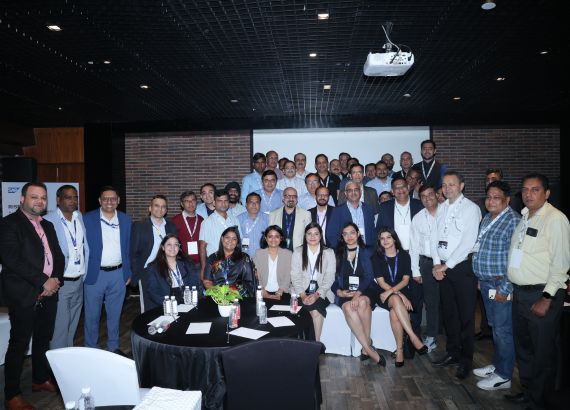
SAP PKOM 2025 in Goa

It was an incredible experience at SAP PKOM 2025 in Goa full of Insightful sessions, networking with industry leaders, and exploring the latest innovations in the SAP ecosystem—this event had it all.

A big thank you to SAP for organizing such a fantastic event. Looking forward to implementing these learnings and driving more success! 💡✨

Article Link

ACMA Generative AI Event 2025

At ACMA, where we explored how Gen AI is driving business transformation in the automotive components industry. Here’s how this technology is reshaping the sector:

🔹 𝐃𝐞𝐬𝐢𝐠𝐧 𝐎𝐩𝐭𝐢𝐦𝐢𝐳𝐚𝐭𝐢𝐨𝐧 –
       AI-driven designs enhance efficiency, strength & manufacturability.

🔹 𝐌𝐚𝐧𝐮𝐟𝐚𝐜𝐭𝐮𝐫𝐢𝐧𝐠 𝐄𝐟𝐟𝐢𝐜𝐢𝐞𝐧𝐜𝐲 –
       Predicting bottlenecks & optimizing resource allocation.

🔹 𝐒𝐮𝐩𝐩𝐥𝐲 𝐂𝐡𝐚𝐢𝐧 𝐌𝐚𝐧𝐚𝐠𝐞𝐦𝐞𝐧𝐭 –
       Demand forecasting, inventory optimization & logistics streamlining.

🔹 𝐐𝐮𝐚𝐥𝐢𝐭𝐲 𝐂𝐨𝐧𝐭𝐫𝐨𝐥 –
       Real-time defect detection for superior product standards.

🔹 𝐏𝐫𝐞𝐝𝐢𝐜𝐭𝐢𝐯𝐞 𝐌𝐚𝐢𝐧𝐭𝐞𝐧𝐚𝐧𝐜𝐞 –
       AI-powered insights prevent breakdowns & extend vehicle lifespan.

𝑲𝒆𝒚 𝑩𝒆𝒏𝒆𝒇𝒊𝒕𝒔 𝒇𝒐𝒓 𝑩𝒖𝒔𝒊𝒏𝒆𝒔𝒔𝒆𝒔

✅ Increased efficiency & cost reduction
✅ Enhanced innovation & competitiveness
✅ Personalized customer experiences

Article Link

SAP Excellence Conference

We successfully wrapped up our SAP event which was jointly hosted by Denpro and SAP India, where we delved into RISE with SAP, SAP AI, SAP Business Technology Platform(BTP), and Intelligent Spend and Business Network (ISBN). We also showcased our capabilities in driving digital transformation and enhancing business efficiency through SAP solutions.   A big thank you to our participants, partners, and team for making this event a success. We look forward to continuing to lead innovation and create value through our in-house developed SAP solutions such as Digital Signature Solution, Master Data Management Solution, etc.   Stay connected for more exciting updates!

Article Link

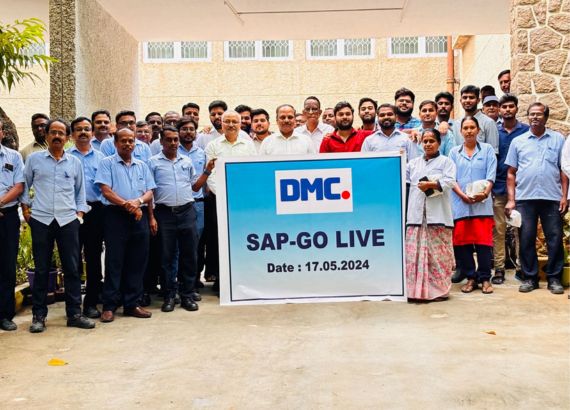
SAP Go Live (DMC)

Excited to announce the successful SAP S/4HANA implementation for Dalmia Magnesite Corporation! Kudos to the team for their dedication!

Article Link

Comparing Kernel BAdI and Classical BAdI: Understanding the Differences in SAP Enhancement Frameworks

Kernel BAdI (Business Add-In) and Classical BAdI are two different types of enhancement frameworks provided by SAP. While they serve similar purposes of extending and customizing standard SAP applications, they differ in terms of implementation, flexibility, and compatibility. Here are the details about their differences:

Implementation Approach:
Kernel BAdI: Kernel BAdIs are implemented using modifications to the ABAP kernel. They require changes to the SAP system’s core code, which means that they directly modify the underlying SAP objects.
Classical BAdI: Classical BAdIs are implemented using object-oriented programming (OOP) principles in ABAP. They involve the creation of enhancement spots and enhancement implementations within the standard SAP code.

Flexibility:

Kernel BAdI: Since Kernel BAdIs require changes to the core code, they offer higher flexibility in terms of making extensive modifications to the standard SAP behavior. Kernel BAdIs can be used to modify both the input and output of the standard code.
Classical BAdI: Classical BAdIs provide a flexible way to enhance the standard SAP functionality. They allow you to add or replace specific methods within the standard code. However, they are limited to the predefined extension points provided by SAP.

Compatibility:

Kernel BAdI: Kernel BAdIs are more tightly coupled with the underlying SAP system. As a result, they may be more prone to compatibility issues during system upgrades or patch implementations. Modifying the core code directly can introduce risks and may require additional effort to adapt the enhancements to new system versions.
Classical BAdI: Classical BAdIs are designed to be more compatible and upgrade-safe. They follow the principles of object-oriented programming and encapsulation, allowing you to implement enhancements without directly modifying the standard code. This makes it easier to maintain and transport enhancements across different system versions.

Usage Scenarios:

Kernel BAdI: Kernel BAdIs are typically used for complex and extensive modifications to the standard SAP behavior. They are suited for cases where the standard functionality needs to be altered significantly or when there is a need to change system-wide behavior.
Classical BAdI: Classical BAdIs are suitable for smaller, specific enhancements within the standard SAP functionality. They are often used to adjust or extend the behavior of a specific application area or a particular business process.

In recent SAP releases, SAP has been encouraging the usage of Classical BAdIs and providing more support for them. Kernel BAdIs are still available but should be used cautiously, considering the potential risks and compatibility issues associated with modifying the core code.

It’s worth noting that the terminology and concepts around BAdIs may evolve over time as SAP continues to develop and enhance its technologies. Therefore, it’s recommended to consult the official SAP documentation for the most up-to-date information and best practices regarding BAdIs.

Exploring External Breakpoints in SAP ABAP: A Powerful Debugging Tool for Program Analysis

In SAP ABAP, an external breakpoint is a debugging mechanism that allows you to pause the execution of a program at a specific point in the source code. Unlike regular breakpoints, which are set within the ABAP development environment (SE80), external breakpoints are set directly in the running program using a user ID.

When an external breakpoint is encountered during program execution, the system will pause and transfer control to the ABAP debugger, enabling you to analyze the program’s current state, check variable values, and step through the code to identify and fix any issues.

External breakpoints are useful in scenarios where you want to debug a program that is executed under a different user ID or when you need to debug a program running in a different system. By setting the external breakpoint using the user ID and maintaining it in the debugging settings, you can ensure that the program execution halts at the desired location for analysis and troubleshooting.

Step to debug on another client id thourgh external breakpoint,

  1. Set an external breakpoint in the user ID for debugging purposes, specifying the location in the source code where the breakpoint is required. Additionally, ensure that the user ID is maintained in the utility settings under “Go To Debugging” section, along with other user IDs who will be running the program.
  2. Execute the program under a different user ID if someone else needs to debug it.
  3. Prior to running the program, enter the following command in the Command Prompt, replacing “USERNAME” with the sy-uname of the person who wishes to debug it: /hext USER = USERNAME (Note: Replace “SPACE” with the actual space, not the word “SPACE”.)

Example: /hext USER = CONSABAP

SAP ECC or SAP S/4HANA: Choosing the Right ERP for Your Digital Transformation Journey:

SAP, a multinational German corporation established in 1972, is renowned for its expertise in enterprise resource planning (ERP) software. With global revenue surpassing €27 billion and a staggering number of over 240 million cloud subscribers, SAP has become a dominant player in the industry.

ERP software developed by SAP optimizes efficiency and enhances customer experience across various business functions. From finance, inventory, and asset management to sales, HR, marketing, and product development, SAP’s ERP solutions empower organizations to streamline their operations and achieve their business goals.

In 2015, SAP introduced its flagship ERP software, SAP S/4HANA, representing a significant advancement over its predecessor, SAP ECC. However, despite the introduction of SAP S/4HANA, numerous businesses continue to rely on SAP ECC. It is crucial to note that SAP will discontinue its maintenance and support for SAP ECC by 2027, compelling companies to migrate to SAP S/4HANA. Therefore, it is essential to understand the key differences between these two systems before embarking on the migration journey.

By comprehending the disparities between SAP ECC and SAP S/4HANA, businesses can adequately prepare for the transition and leverage the new functionalities and features offered by the latest ERP solution. In the following sections, we will delve into the detailed comparison between SAP ECC and SAP S/4HANA, enabling you to make an informed decision for your organization’s future.

What is SAP ECC?

SAP ERP Central Component is also known as SAP ECC. Due to its modular design, SAP ECC is very customizable. From finance to human resources to logistics, SAP ECC may be tailored to your needs in every aspect of your business. Additionally, SAP ECC supports bespoke or third-party applications like business messaging apps.

Due to the numerous relationships between its components, SAP ECC is both versatile and complex. Changes in one area have an impact on how other areas operate. In order to avoid interfering with crucial business operations, you must carefully plan modifications like upgrades and additions. The transition of your systems to SAP S/4HANA also falls under this.

What is SAP S/4HANA?

SAP S/4HANA is the next-generation ERP (Enterprise Resource Planning) software offered by SAP. It represents a significant advancement over its predecessor, SAP ECC. The “S” in S/4HANA stands for Simple, as SAP S/4HANA aims to simplify business processes and enable real-time data processing and analytics.

One of the key differentiators of SAP S/4HANA is its underlying architecture, which is built on the SAP HANA in-memory computing platform. This enables rapid data processing and analysis, providing businesses with real-time insights and the ability to make informed decisions quickly.

SAP S/4HANA also introduces a modern and intuitive user interface called SAP Fiori. It offers a user-friendly and personalized experience across devices, enhancing user productivity and engagement.

What Differences SAP S/4HANA from SAP ECC?

  1. Architecture: SAP S/4HANA is built on the SAP HANA in-memory computing platform, whereas SAP ECC is based on a traditional, three-tier architecture. This difference allows SAP S/4HANA to deliver real-time processing, faster analytics, and immediate access to data.
  2. Data Model: SAP S/4HANA introduces a simplified data model compared to the complex and fragmented structure of SAP ECC. It eliminates redundant tables, aggregates, and indexes, resulting in improved performance and streamlined data management.
  3. User Experience: SAP S/4HANA offers a modern and intuitive user experience through the SAP Fiori interface. Fiori provides a role-based, personalized, and responsive design, making it easier for users to navigate and interact with the system. SAP ECC primarily relies on the transaction-based SAP GUI.
  4. Reporting and Analytics: SAP S/4HANA enables real-time analytics and reporting directly on live transactional data. It includes embedded analytics, advanced data visualization, and predictive analytics capabilities. In contrast, SAP ECC often requires separate reporting tools like SAP Business Warehouse or SAP Business Objects for advanced analytics.
  5. Industry-Specific Functionality: SAP S/4HANA incorporates industry-specific functionalities directly into the core system, reducing the reliance on add-ons. This enables organizations to leverage industry-specific best practices and processes from the start. SAP ECC often requires additional add-on modules to meet industry-specific requirements.

New Features in SAP S/4HANA

  1. SAP Fiori User Experience: SAP S/4HANA introduces the SAP Fiori user interface, which offers a modern and intuitive user experience across devices. Fiori provides role-based dashboards, personalized workspaces, and responsive design, making it easier for users to navigate and interact with the system.
  2. Smart Business Cockpits: SAP S/4HANA includes Smart Business cockpits, which provide users with real-time insights and KPIs relevant to their roles. These pre-configured analytical dashboards offer a consolidated view of business data, enabling users to monitor key metrics and make informed decisions.
  3. Advanced Search Capabilities: SAP S/4HANA introduces advanced search capabilities through SAP Fiori. Users can quickly search for specific business objects, transactions, or information using natural language processing and predictive search, improving efficiency and reducing time spent on navigation.
  4. Real-time Analytics and Reporting: With the in-memory computing capabilities of SAP HANA, SAP S/4HANA delivers real-time analytics and reporting directly on live transactional data. Users can generate on-the-fly reports, create interactive visualizations, and perform ad-hoc analysis, gaining immediate insights for decision-making.
  5. Personalized Workflows and Notifications: SAP S/4HANA enables users to define personalized workflows and receive notifications based on their roles and responsibilities. This feature enhances collaboration and enables users to stay informed about critical business events, approvals, or tasks that require their attention.

The benefits of Switching to SAP S/4HANA

Improved efficiency was cited as the top benefit of SAP S/4HANA in 2021 by 72% of organizations, followed by increased satisfaction (61%). Moving to SAP S/4HANA has additional advantages, including:

  1. improved compatibility with other SAP products.
  2. Lower expenses, such as lower ownership and operating expenses.
  3. Simplified data models result in a smaller database footprint.
  4. Automated procedures increase output and effectiveness.
  5. quicker and wiser decision-making.
  6. increased earnings overall.

SAP MM Certification: Everything You Need to Know

What is SAP Materials Management(MM) Certification?

SAP MM certification is a professional credential offered by SAP AG that recognizes an individual’s proficiency in using the SAP Material Management (MM) module. This certification program assesses the candidate’s knowledge and skills in various areas such as procurement, inventory management, material master data, and invoice verification.
The SAP MM certification exam is conducted by SAP AG and is available in various formats such as online and on-site. The exam is designed to evaluate the candidate’s knowledge and understanding of the SAP MM module and their ability to apply the best practices in procurement and inventory management processes.

There are different levels of SAP MM certification, including Associate, Professional, and Master levels. The Associate level certification is intended for individuals who have a basic understanding of the SAP MM module. The Professional level certification is for experienced professionals who have demonstrated advanced knowledge and skills in the SAP MM module. The Master level certification is the highest level of SAP MM certification and is designed for professionals who have extensive experience and a deep understanding of the SAP MM module.

Benefits of SAP MM Certification:

Obtaining SAP MM certification can provide several benefits, including:

1-Validation of knowledge and expertise:SAP MM certification validates an individual’s knowledge and expertise in the SAP MM module. It demonstrates to potential employers that an individual has the necessary skills to perform effectively in a role that requires knowledge of this module.

2-Career advancement opportunities: SAP MM certification can provide opportunities for career advancement. Certified individuals are often considered for higher-level positions and are more likely to receive promotions and salary increases.

3-Increased earning potential: SAP MM certification can lead to increased earning potential. Certified individuals are often paid more than their non-certified counterparts and have more job opportunities available to them.

Preparing for SAP MM Certification:

To prepare for SAP MM certification, individuals should consider taking a training course or workshop that covers the module’s key concepts and functions. They can also use study materials, such as SAP MM certification books or online study guides.

Individuals should also practice using the SAP MM module in a real-world environment. This can be done by working on SAP MM projects or by using a sandbox environment to test their skills and knowledge.

 Some of the Job Opportunities in SAP MM:

There are several job opportunities available for individuals with SAP MM certification. These include:

1-SAP MM Consultant: SAP MM consultants work with organizations to implement the SAP MM module and provide support for their procurement and inventory management functions.

2-Materials Manager: Materials managers are responsible for managing an organization’s inventory levels and ensuring that they have the necessary materials on hand to meet their production needs.

3-Purchasing Manager: Purchasing managers are responsible for managing an organization’s purchasing process and ensuring that they are getting the best prices and terms from their suppliers.

4-Supply Chain Manager: Supply chain managers are responsible for managing an organization’s supply chain and ensuring that they are operating efficiently and effectively.

SAP MM certification is an industry-recognized credential that validates an individual’s knowledge and expertise in the SAP MM module. Obtaining this certification can provide several benefits, including career advancement opportunities, increased earning potential, and job opportunities in various roles. To prepare for SAP MM certification, individuals should consider taking a training course or workshop, using study materials, and practicing their skills in a real-world environment.

Streamlining GST Compliance with SAP GST Connectors Suite

The SAP GST Connector Suite is a powerful tool that allows businesses to easily manage their GST (Goods and Services Tax) compliance requirements. The GST Connector Suite provides a range of features and functionalities to help businesses stay compliant with GST regulations, including real-time tax calculations, tax reporting, and tax remittance.

The SAP GST Connector Suite is fully integrated with SAP systems, allowing businesses to seamlessly manage their GST compliance requirements within their existing SAP landscape. The GST Connector Suite includes pre-built connectors for various SAP systems, including SAP ERP, SAP S/4HANA, and SAP Business One, making it easy for businesses to get started with the tool.

Some benefits of SAP GST Connectors:

Streamlined GST Compliance: The SAP GST Connector Suite provides businesses with an end-to-end solution for managing their GST compliance requirements. The tool automates GST processes and provides real-time tax calculation capabilities, ensuring that businesses are always up-to-date with the latest tax rates and rules.

Increased Efficiency: The SAP GST Connector Suite reduces manual effort and increases efficiency by automating GST compliance processes. The tool provides pre-built connectors for various SAP systems, making it easy for businesses to get started with the tool and reducing implementation time.

Improved Accuracy: The real-time tax calculation capabilities of the SAP GST Connector Suite ensure that businesses are always using the correct tax rates and rules, reducing the risk of errors and ensuring accuracy in GST-related transactions.

Better Visibility: The SAP GST Connector Suite provides businesses with greater visibility into their GST-related data, allowing them to make more informed business decisions. The tool provides detailed insights into tax-related transactions, allowing businesses to identify areas for improvement and optimization.

Cost Savings: The automation and efficiency provided by the SAP GST Connector Suite can lead to cost savings for businesses by reducing the need for manual effort and increasing accuracy in GST-related transactions.

In addition to its compliance features, the SAP GST Connector Suite also provides businesses with greater visibility into their GST-related data, allowing them to make more informed business decisions. The tool provides detailed insights into tax-related transactions, allowing businesses to identify areas for improvement and optimization.

Overall, the SAP GST Connector Suite is an essential tool for businesses operating in India, helping them stay compliant with GST regulations while increasing efficiency and visibility into their GST-related data. The SAP GST Connector Suite provides businesses with a range of benefits, helping them stay compliant with GST regulations while increasing efficiency, accuracy, and visibility into their GST-related data.

Error: Contact form not found.

Error: Contact form not found.

Error: Contact form not found.

Error: Contact form not found.